Display a precipitation globe with MapLibre GL JS
Add a global precipitation raster layer to a globe with MapLibre GL JS. The example displays the latest snapshot over OpenFreeMap’s light Positron basemap.
Keep your API key on the server
We do not recommend putting API keys in frontend code. Browser code and network requests are visible to users. This example calls a backend proxy on the same origin; only the server adds the API key.
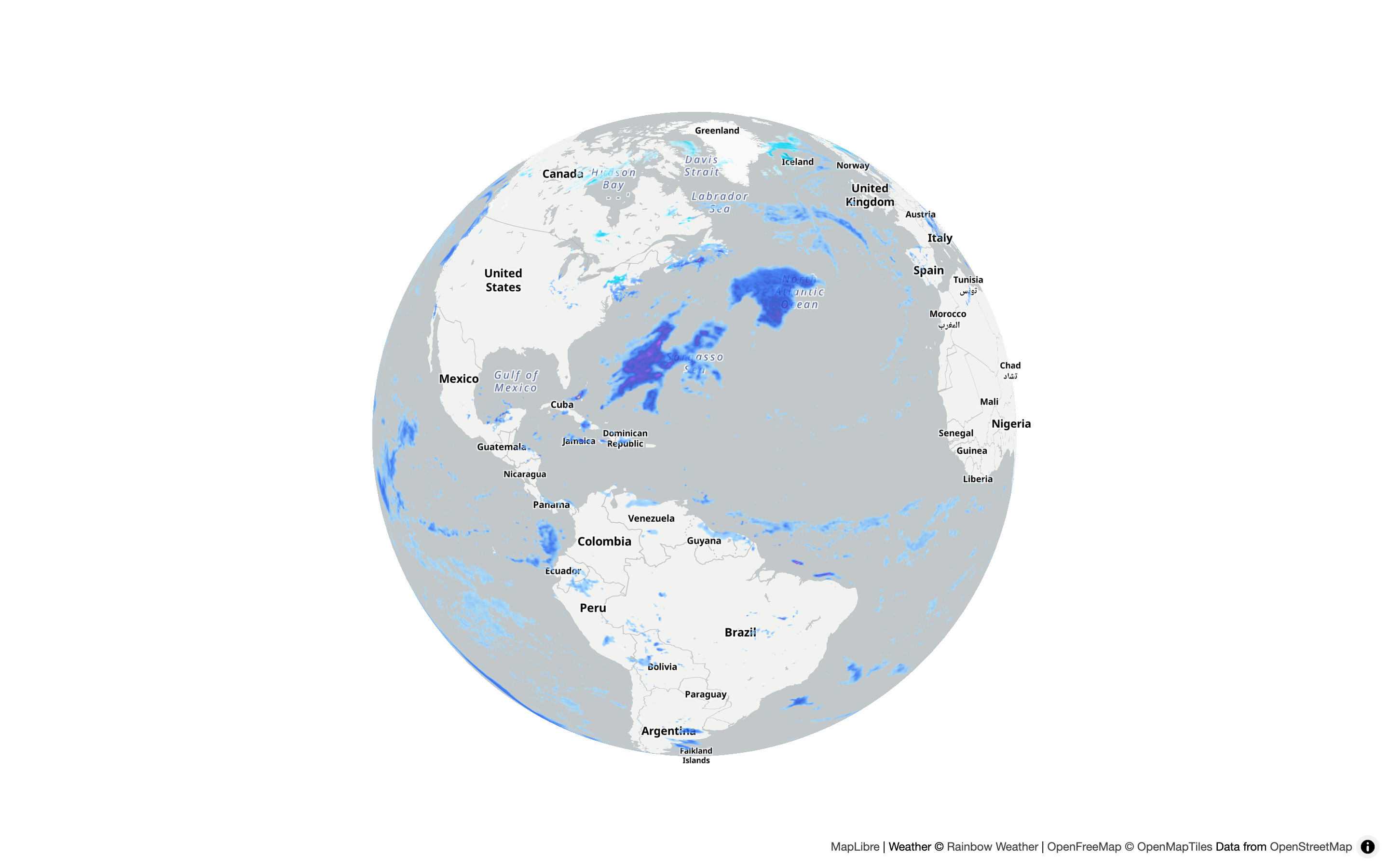
Static preview. The weather will differ when you run the example.
Map example
Save as maplibre.html. It uses MapLibre GL JS 6.18.0, the precip-global layer, forecast offset 0, and palette color=0.
<!doctype html>
<html lang="en">
<head>
<meta charset="utf-8">
<meta name="viewport" content="width=device-width, initial-scale=1">
<title>Precipitation globe with MapLibre</title>
<link
rel="stylesheet"
href="https://unpkg.com/[email protected]/dist/maplibre-gl.css"
>
<style>
body {
margin: 0;
background: white;
}
#map {
height: 100vh;
}
#error {
position: absolute;
top: 10px;
left: 10px;
padding: 12px;
background: white;
color: #a00;
font: 14px sans-serif;
}
#error:empty {
display: none;
}
</style>
</head>
<body>
<div id="map" aria-label="Precipitation globe"></div>
<p id="error" role="alert"></p>
<script type="module">
import * as maplibregl from 'https://unpkg.com/[email protected]/dist/maplibre-gl.mjs';
// Create the map and its basemap.
const map = new maplibregl.Map({
container: 'map',
style: 'https://tiles.openfreemap.org/styles/positron',
center: [-60, 20],
zoom: 2.3
});
// Show map and tile loading errors.
map.on('error', () => {
document.getElementById('error').textContent =
'Map data unavailable. Check the proxy and reload.';
});
map.on('style.load', async () => {
map.setProjection({ type: 'globe' });
// We do not recommend storing API keys in frontend code.
// The backend proxy adds the key on the server.
try {
// Request the current snapshot through the backend.
const response = await fetch('/tiles/v1/snapshot?layer=precip-global');
if (!response.ok) {
throw new Error('Could not load weather. Check the proxy and API key.');
}
const { snapshot } = await response.json();
// Add precipitation tiles for this snapshot.
map.addSource('weather', {
type: 'raster',
tiles: [`${location.origin}/tiles/v1/precip-global/${snapshot}/0/{z}/{x}/{y}?color=0`],
tileSize: 256,
maxzoom: 12,
attribution: 'Weather © <a href="https://rainbow.ai/">Rainbow Weather</a>'
});
map.addLayer({
id: 'weather',
type: 'raster',
source: 'weather',
paint: { 'raster-opacity': 0.8 }
});
} catch (error) {
// Show snapshot request errors on the map.
document.getElementById('error').textContent = error.message;
}
});
</script>
</body>
</html>
Backend proxy
Save the shared server below as tiles_service.py beside the HTML file. It serves the page and forwards snapshot and tile requests to Rainbow Weather with the API key added on the server.
Show the Python server
"""Serve the map examples locally; the Rainbow API key never goes to the browser."""

import os
from pathlib import Path

from dotenv import load_dotenv
from fastapi import FastAPI, HTTPException
from fastapi.responses import FileResponse, JSONResponse, Response
import requests
import uvicorn


# Load the API key on the server. Never send it to the browser.
load_dotenv()  # Reads .env beside this file or in a parent folder.
API_KEY = os.getenv("RAINBOW_API_KEY")
API_URL = "https://api.rainbow.ai/tiles/v1"
EXAMPLE_DIR = Path(__file__).resolve().parent

app = FastAPI()


# Make authenticated requests to the Rainbow API.
def api_get(path, params):
    if not API_KEY:
        raise HTTPException(503, "Set RAINBOW_API_KEY in .env and restart the server.")

    try:
        response = requests.get(
            f"{API_URL}/{path}",
            params=params,
            headers={"Ocp-Apim-Subscription-Key": API_KEY},
            timeout=10,
            allow_redirects=False,
        )
    except requests.Timeout:
        raise HTTPException(504, "The weather API timed out. Please try again.") from None
    except requests.RequestException:
        raise HTTPException(502, "The weather API could not be reached.") from None

    if response.status_code != 200:
        status = response.status_code if 400 <= response.status_code <= 599 else 502
        raise HTTPException(
            status,
            f"Weather API returned HTTP {status}. "
            "Check your key, subscription, or requested data.",
        )

    return response


# Return the latest snapshot timestamp for the selected weather layer.
@app.get("/tiles/v1/snapshot")
def snapshot(layer: str = "precip-global"):
    if layer not in ("precip-global", "radars", "clouds"):
        raise HTTPException(422, "Choose precip-global, radars, or clouds.")

    try:
        timestamp = api_get("snapshot", {"layer": layer}).json()["snapshot"]
    except (ValueError, KeyError, TypeError):
        raise HTTPException(502, "The weather API returned an invalid snapshot.") from None

    if type(timestamp) is not int or timestamp <= 0 or timestamp % 600:
        raise HTTPException(502, "The weather API returned an invalid snapshot.")

    return JSONResponse({"snapshot": timestamp}, headers={"Cache-Control": "no-store"})


# Validate tile coordinates and upstream image responses.
def validate_tile(snapshot, zoom, x, y, max_zoom):
    if not (
        snapshot > 0
        and snapshot % 600 == 0
        and 0 <= zoom <= max_zoom
        and 0 <= x < 2**zoom
        and 0 <= y < 2**zoom
    ):
        raise HTTPException(422, "Invalid snapshot, tile coordinates, or zoom.")


def image_tile(path, params):
    response = api_get(path, params)
    content = response.content

    if content.startswith(b"\x89PNG\r\n\x1a\n"):
        media_type = "image/png"
    elif content.startswith(b"RIFF") and content[8:12] == b"WEBP":
        media_type = "image/webp"
    else:
        raise HTTPException(502, "The weather API returned an invalid tile image.")

    declared_type = response.headers.get("Content-Type", "").split(";")[0].strip().lower()
    if declared_type and declared_type != media_type:
        raise HTTPException(502, "The weather API returned a mismatched tile format.")

    return Response(content, media_type=media_type)


# Forward precipitation, radar, and cloud tiles to the browser.
@app.get("/tiles/v1/precip-global/{snapshot}/0/{zoom}/{x}/{y}")
def tile(snapshot: int, zoom: int, x: int, y: int, color: int = 0):
    validate_tile(snapshot, zoom, x, y, max_zoom=12)
    if not 0 <= color <= 9:
        raise HTTPException(422, "Choose a palette from 0 to 9.")

    return image_tile(f"precip-global/{snapshot}/0/{zoom}/{x}/{y}", {"color": color})


@app.get("/tiles/v1/radars/{snapshot}/{zoom}/{x}/{y}")
def radar_tile(
    snapshot: int,
    zoom: int,
    x: int,
    y: int,
    color: int = 0,
    use_precip_type: bool = False,
    coverage: bool = False,
):
    validate_tile(snapshot, zoom, x, y, max_zoom=7)
    if not 0 <= color <= 9:
        raise HTTPException(422, "Choose a palette from 0 to 9.")

    return image_tile(
        f"radars/{snapshot}/{zoom}/{x}/{y}",
        {
            "color": color,
            "use_precip_type": int(use_precip_type),
            "coverage": int(coverage),
        },
    )


@app.get("/tiles/v1/clouds/{snapshot}/{zoom}/{x}/{y}")
def clouds_tile(snapshot: int, zoom: int, x: int, y: int):
    validate_tile(snapshot, zoom, x, y, max_zoom=7)

    return image_tile(f"clouds/{snapshot}/{zoom}/{x}/{y}", {})


# Serve only the example HTML pages, never the key or Python source.
@app.get("/{page:path}")
def example_page(page: str):
    pages = {
        "": "leaflet.html",
        "leaflet.html": "leaflet.html",
        "maplibre": "maplibre.html",
        "maplibre.html": "maplibre.html",
        "radar": "radar.html",
        "radar.html": "radar.html",
        "clouds": "clouds.html",
        "clouds.html": "clouds.html",
    }

    filename = pages.get(page)
    if filename is None:
        raise HTTPException(404, "Page not found.")

    path = EXAMPLE_DIR / filename
    if not path.is_file():
        raise HTTPException(404, f"Save {filename} beside tiles_service.py.")

    return FileResponse(path)


# Start the local example server.
if __name__ == "__main__":
    uvicorn.run(app, host="127.0.0.1", port=8000)
Run locally
Use Python 3.10+. Create a folder for the two files above and install the dependencies:
python -m venv .venv
source .venv/bin/activate
python -m pip install fastapi uvicorn requests python-dotenv
On Windows, activate with .venv\Scripts\activate instead. Get a key from Getting started, then create .env beside tiles_service.py:
RAINBOW_API_KEY=YOUR_API_KEY
Keep .env out of source control. From the folder containing the files, start the server:
python tiles_service.py
Open http://127.0.0.1:8000/maplibre rather than opening the HTML file directly. Drag and zoom to explore; reload the page to fetch the latest snapshot. If an error appears, check the server, your key, and subscription access.
To change the colors, replace color=0 in the tile URL with a value from the palette reference. Each fetched weather tile uses your API allowance.
See the Tiles API reference, the MapLibre examples for radar and cloud cover, or the Leaflet precipitation example.